The first interface over a payment system that couldn't be changed
The hard part was not designing the interface. It was understanding a payment system I was not allowed to change.
Overview
A marketplace of 200+ vendors paid out after customers received their orders. The payment logic already existed in the backend. The interface did not — around 50 people ran eligibility, approval and transfer state in spreadsheets, alongside a system that already knew all of it.
- Role
- Designed all four consoles. Research, workflow, information architecture, screens, review cycles.
- Scope
- Four consoles: Vendor · Marketplace · Logistics · Accounts
- Users
- 200+ vendors · 50+ internal staff
- Core concept
- One calculation, one record. Approve and transfer in different seats, so no role can move money alone.
- Impact
- The spreadsheets stopped. Vendor and marketplace read the same number instead of reconciling two.
- Year
- 2026
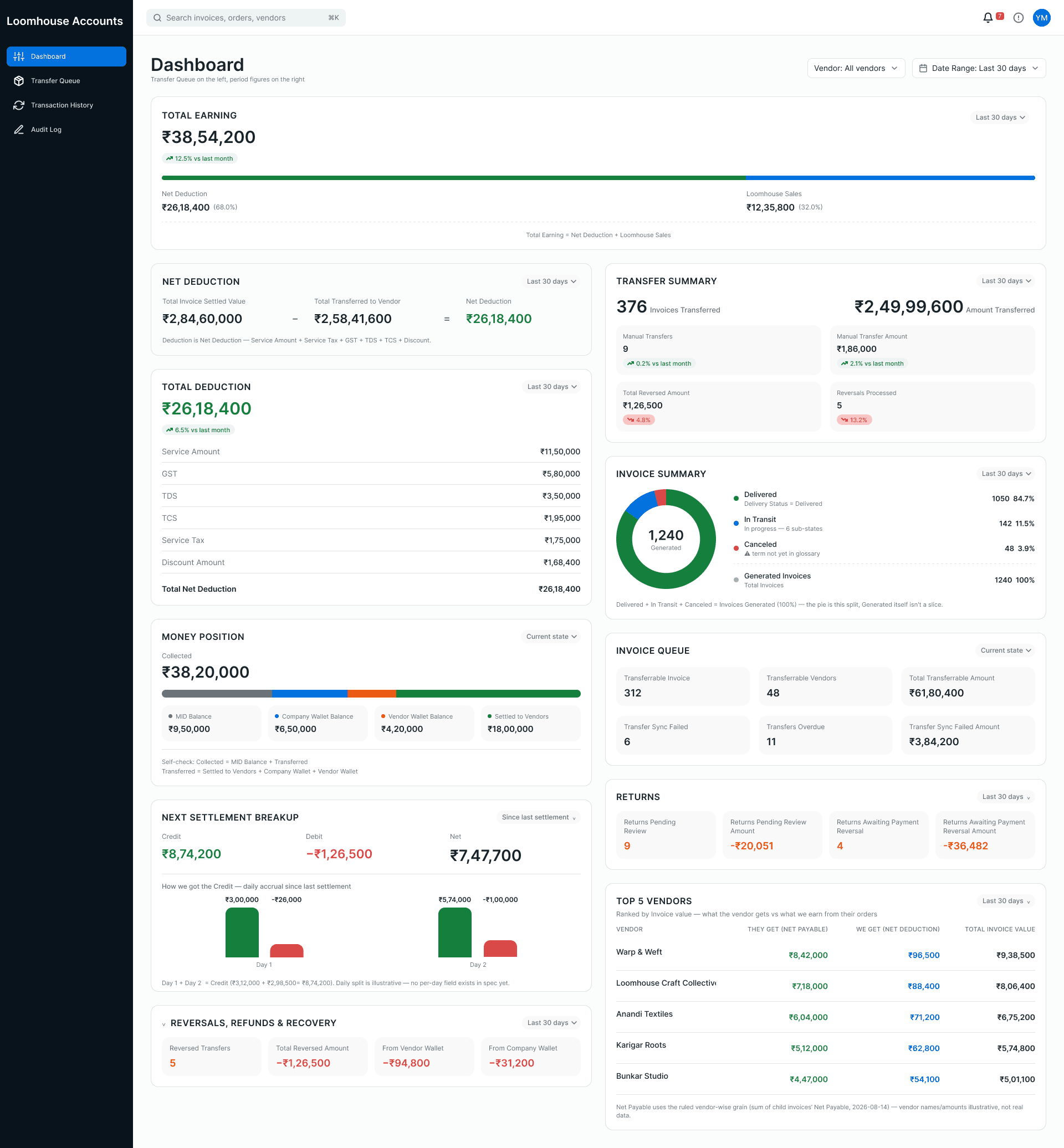
Every figure on this screen is derived from order records. The Money Position block states its own arithmetic, so the page checks itself.
Goals
Have the calculation happen once, automatically, and let vendors and the marketplace look at the same number instead of two versions of it. Transparency here is not a value statement: it means the vendor and the admin read the same record, so there is nothing to reconcile between them.
Client work under confidentiality. Company and vendor names in the screens are replaced, and amounts are illustrative.
Quick background
Between a delivery and the money landing sat commissions, returns, approvals, TDS and TCS deductions, and bank transfers. They looked like four processes. They are one number, recalculated: every return changes what a vendor is owed, which changes the next transfer, which changes the balance after it.
I did not design the payment system. It existed, it worked, and it was not going to change. So the job was the inverse of the usual one — read how the system already behaved, and decide what an honest interface for it looks like. Most of the first week went on understanding, not drawing.
Fig 2Money path
Delivery is the financial trigger. Returns re-enter the ledger as their own negative record rather than editing anything upstream.
Order placed
Delivered
Financial triggerNothing before this pays.
Eligible for payout
Commission, TDS, TCS deducted.
Approved
MarketplaceTransferred
AccountsVendor balance
↺ Return
Posts as its own negative record against the balance. The original order is never edited.
The problems
No interface at all. Not an outdated one — none. Payment state lived in files that were copied, emailed and edited by hand.
The balance sheet did not reconcile. Amounts calculated by hand, by different people, did not agree with what the system held. This is the failure that paid for the work.
Eleven states flattened into one column. Payments and transfers move through created, pending, processed, reversed, failed and more. A spreadsheet holds one of them at a time, typed by hand.
Finance language on screens for people outside finance. The vendor's headline figure said Pending Payable— the marketplace's side of the ledger. The vendor needed Receivable: the same money, from where they stand.
My role
Reading the system. Mapping the backend's order-based model and state machine before designing anything on top of it.
Splitting authority. Deciding which console can do what, so approving and paying never sit in the same seat.
Designing all four consoles. Workflow, information architecture and every screen, through client review cycles.
Designing the edges. Failed transfers, reversals, returns, blocked bulk actions — where operational tools actually hurt.
- 01
- MarketplaceVerifies which delivered orders are eligible and approves them. Cannot transfer.
- 02
- LogisticsOwns delivery status — the event that makes an order payable. Cannot see payment at all.
- 03
- AccountsReleases transfers, retries failures, reverses. Cannot approve or change a business rule.
- 04
- VendorsSee what they earned, what was deducted, what is coming. Approve nothing.
Key decisions
Not inventing an object the system does not have
Transfers happen in batches, so I designed a Settlement object to group them. Then I took it out. The backend is order-based, and every question a settlement could answer, orders already answered. The first time the two disagreed, the interface would be lying.
Cost
The interface does grouping work the data model refuses to do. More view logic, and a permanent risk of drift between what is shown and what is stored.
Why that was the right trade
An auditor follows orders. A vendor disputing an amount follows orders. A concept that exists only on screen has to be maintained by hand forever, and eventually somebody reconciles against it.
Fig 3Rejected, then current
The rejected version looks tidier. That is the trap: it groups cleanly on screen and has nothing behind it.
Rejected
- Settlement #4821
- Order 1194
- Order 1207
- Order 1213
A record you can open, name and refer to. Exists nowhere in the data.
Current
- Transfer batch (a view)
- Order 1194
- Order 1207
- Order 1213
No record. The grouping is drawn from the orders and exists only while displayed.
Showing the negative balance instead of hiding it
The system posts a return as its own negative record. If that pushes a vendor below zero, no transfer releases until later orders bring the balance back up. That rule was not mine; what to do about it on screen was. I could have shown zero, or moved adjustments somewhere quieter. Both make the screen calmer and the vendor's understanding worse. Nothing is netted out before the user sees it.
Cost
A vendor with one large return sees a negative number, receives nothing that cycle, and had no say in it. The interface delivers that news.
Why
The alternative is a number that does not match reality. A confusing number can be explained in a minute. A wrong one takes weeks to unwind, and costs trust that does not come back.
Fig 4Ledger arithmetic
A blocked cycle generates no transfer record at all. A ₹0 row would imply a payment happened.
| Vendor transaction history | Paid cycle | Blocked cycle |
|---|---|---|
| Delivered orders | ₹ 18,400 | ₹ 4,100 |
| Commission, TDS, TCS | -₹ 2,209 | -₹ 492 |
| Return posted | — | -₹ 9,699 |
| Balance | ₹ 16,191 | -₹ 6,091 |
| Transfer record | ₹ 16,191 | none generated |
Approving what was delivered
The marketplace console is where delivered invoices become payable. Invoices group by vendor, and each group states its own totals — net payable, approvable, transferred, remaining — so a reviewer sees the vendor's position before acting on a single row. The grouping is a view over orders, not a new record.
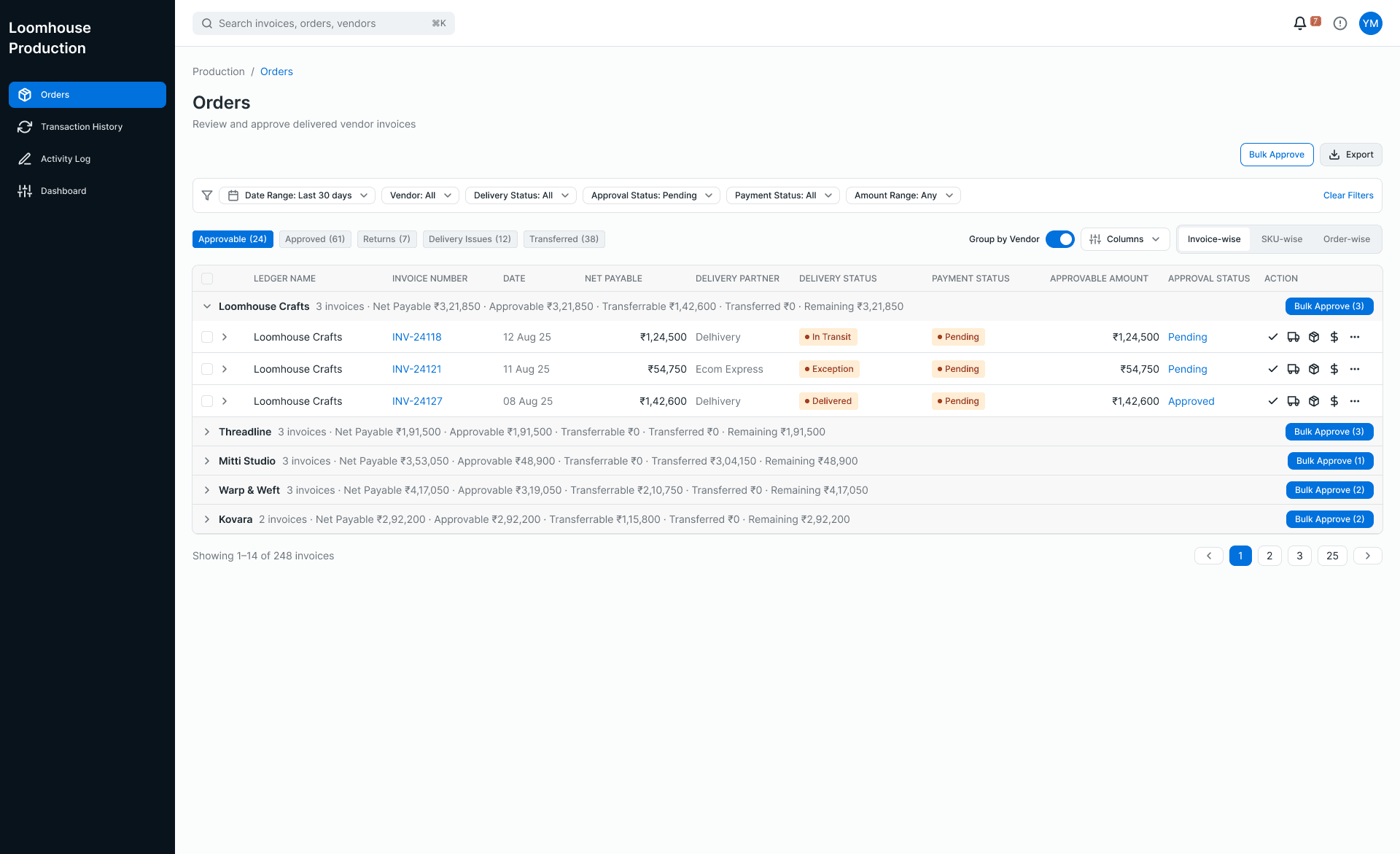
Tabs split what can be approved from returns and delivery issues. Approve is here; transfer is not.
Bulk approval is checked before anything is sent. The dialog separates what will go through from what will not, and every blocked invoice says why. One bulk action is one decision and many records, and the audit log keeps every record.
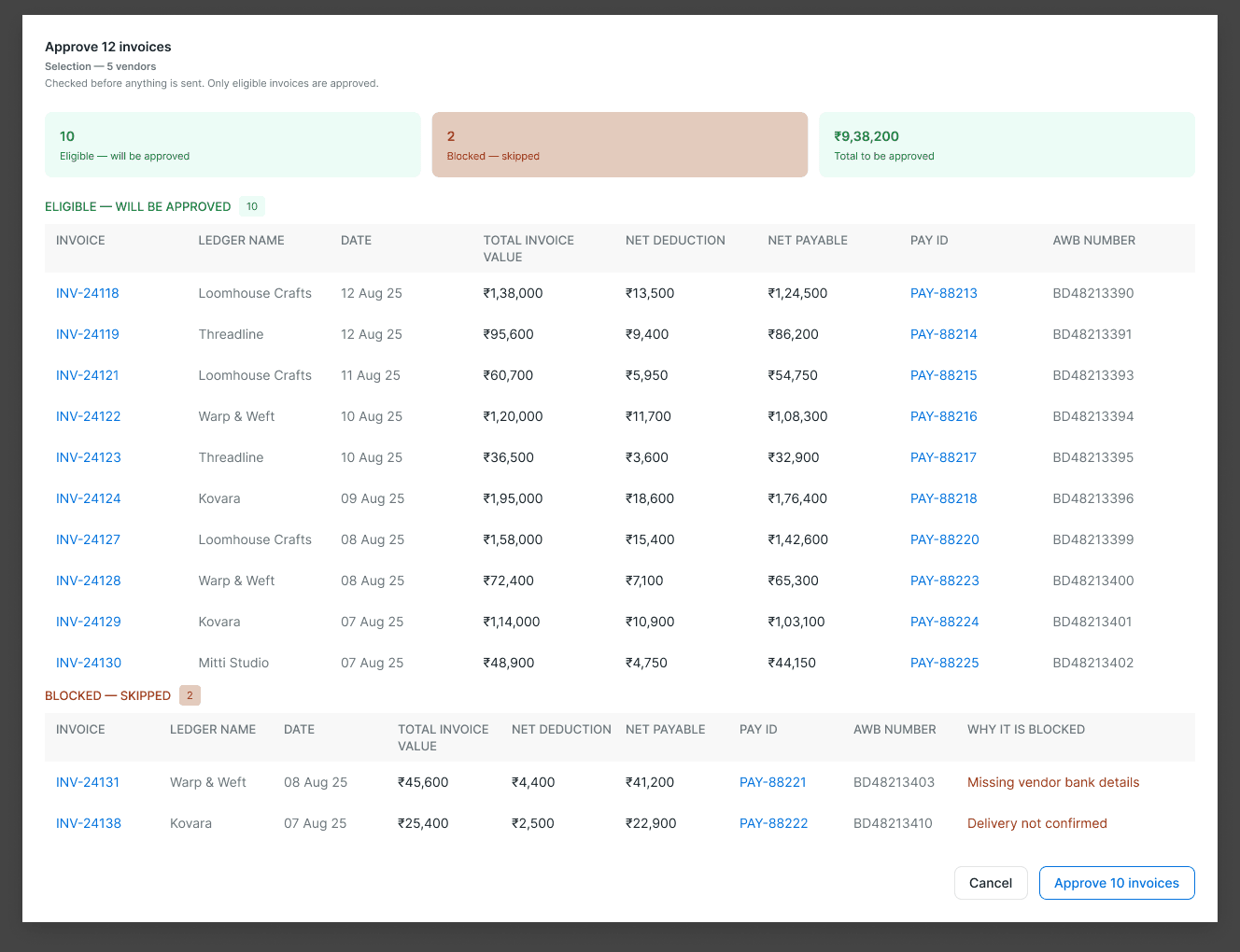
Ten eligible, two blocked: missing vendor bank details, delivery not confirmed. The button approves only the ten.
Transferring the money
Accounts releases money against approved, unpaid invoices. Every state that needs a person has its own tab — transferable, returns awaiting approval, sync failed, reversed, manual — rather than a flag on a row, because the recovery action is different for each. Expanding a row shows every deduction and the invoice's journey from generated to transferred.
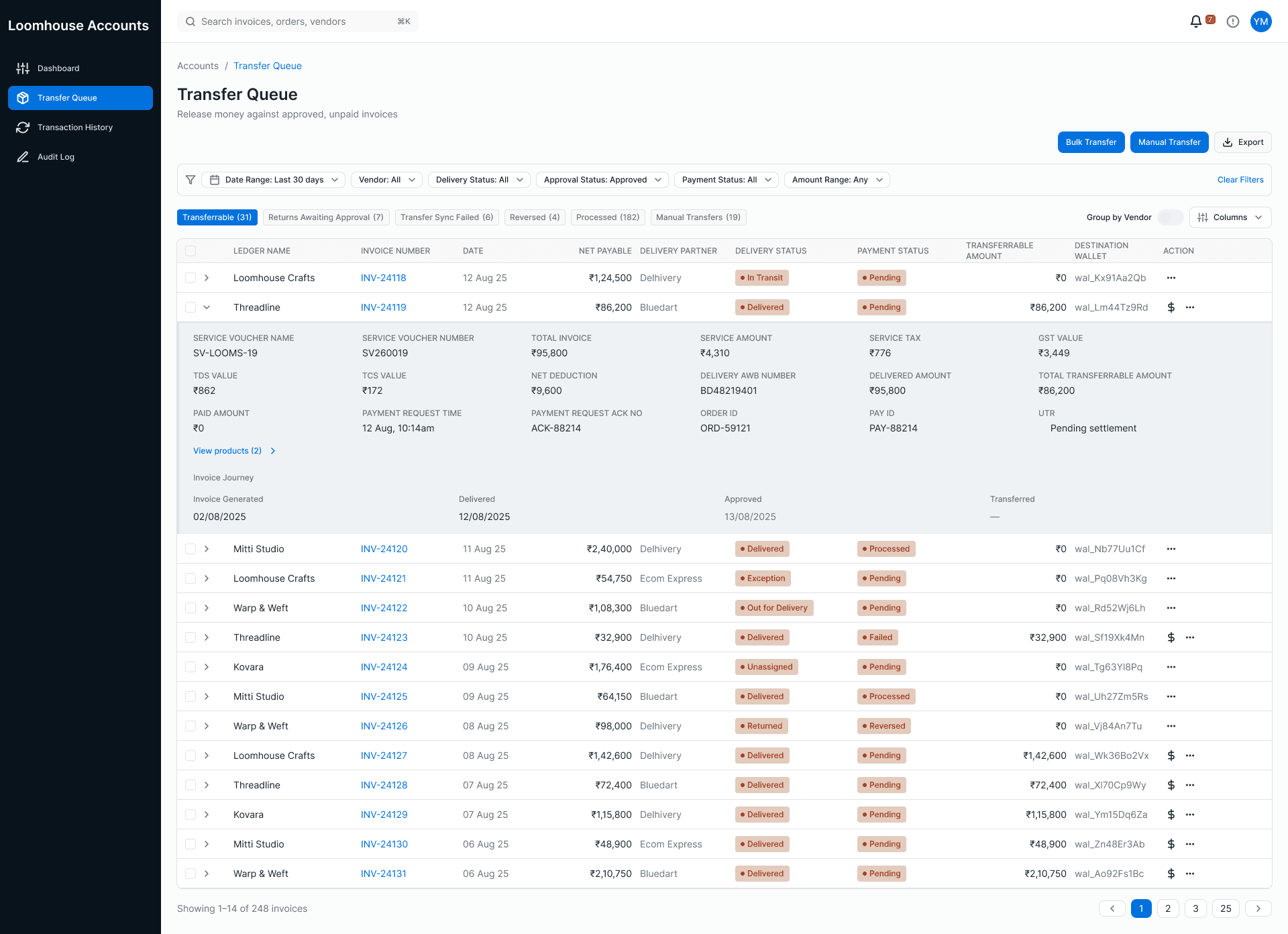
The expanded row carries the arithmetic from total invoice down to transferable amount, so no one reopens a spreadsheet to check it.
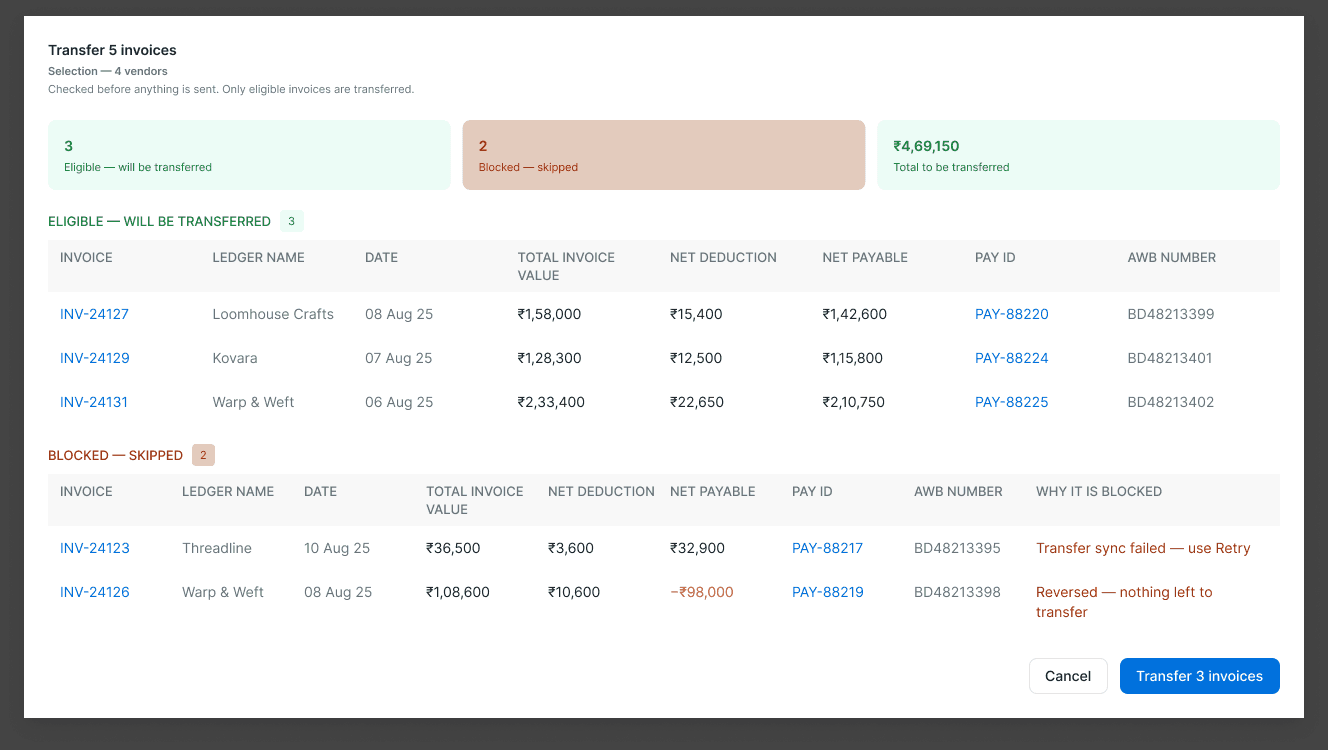
A failed sync points to Retry. A reversed invoice shows its negative amount and states that nothing is left to transfer.
Returns and the states that need a person
Fig 9Payment states
Split by whether a person is required. The right-hand column is what the tabs are built from.
Resolves itself · 6
Moves on its own. Shown as a status and counted on the dashboard.
- created
- pending
- processed
- initiated
- completed
- transfer pending
Needs a person · 5
Stops until someone acts. Each gets its own tab.
- failed
- reversed
- partially reversed
- transfer failed
- manually processed
Returns arrive as their own negative records and wait for approval before the customer is paid back. They are never netted into the original order, so the trail from sale to refund stays readable.
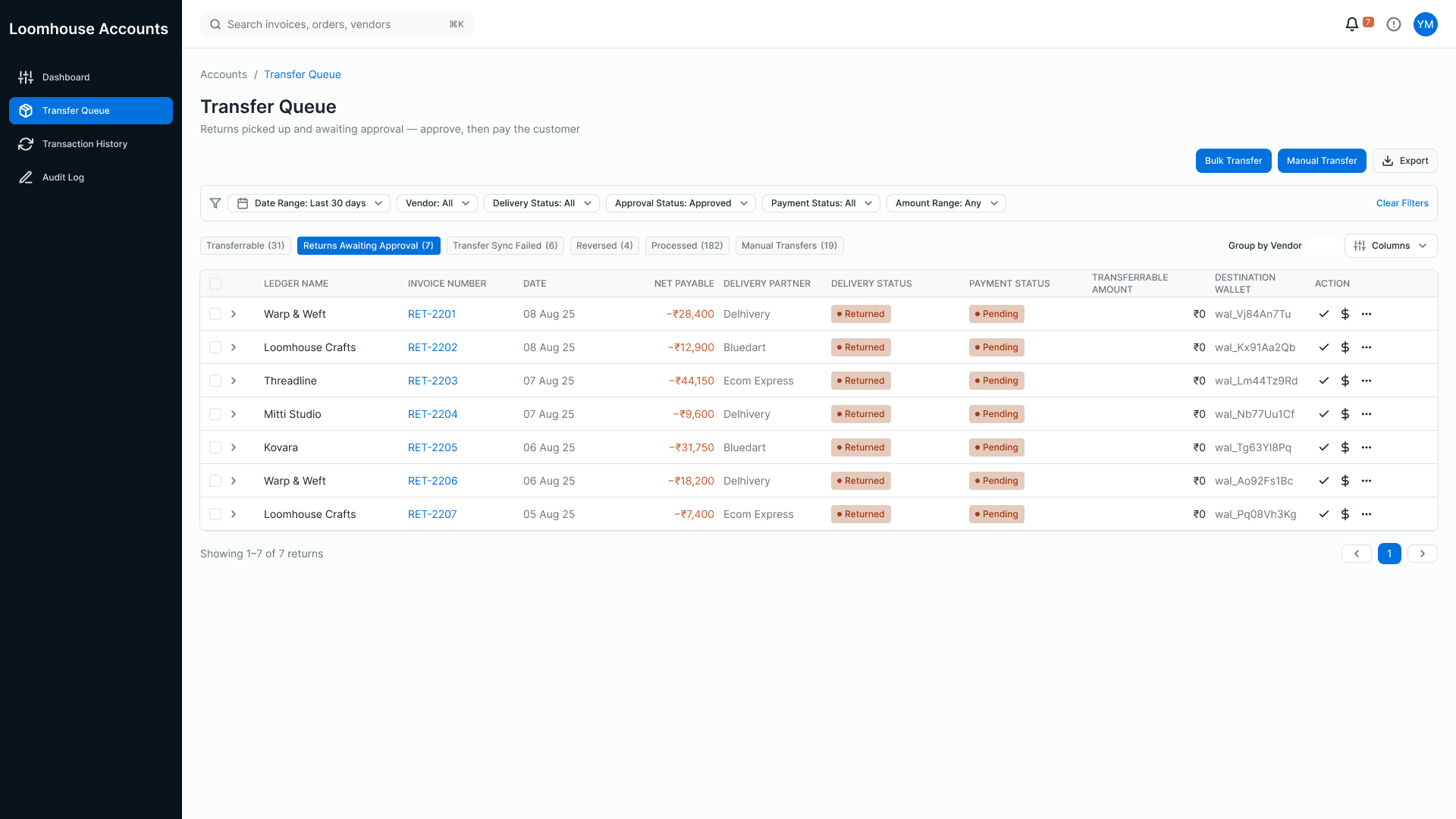
Negative amounts stay negative on screen, in their own queue.
Delivery as a payment event
Delivery status is what makes an order payable, so a courier problem is a payment problem. The logistics console groups shipments by delivery partner, keeps exceptions, returns to origin and sync failures in their own tabs, and shows the full tracking timeline on the row. It never shows payment.
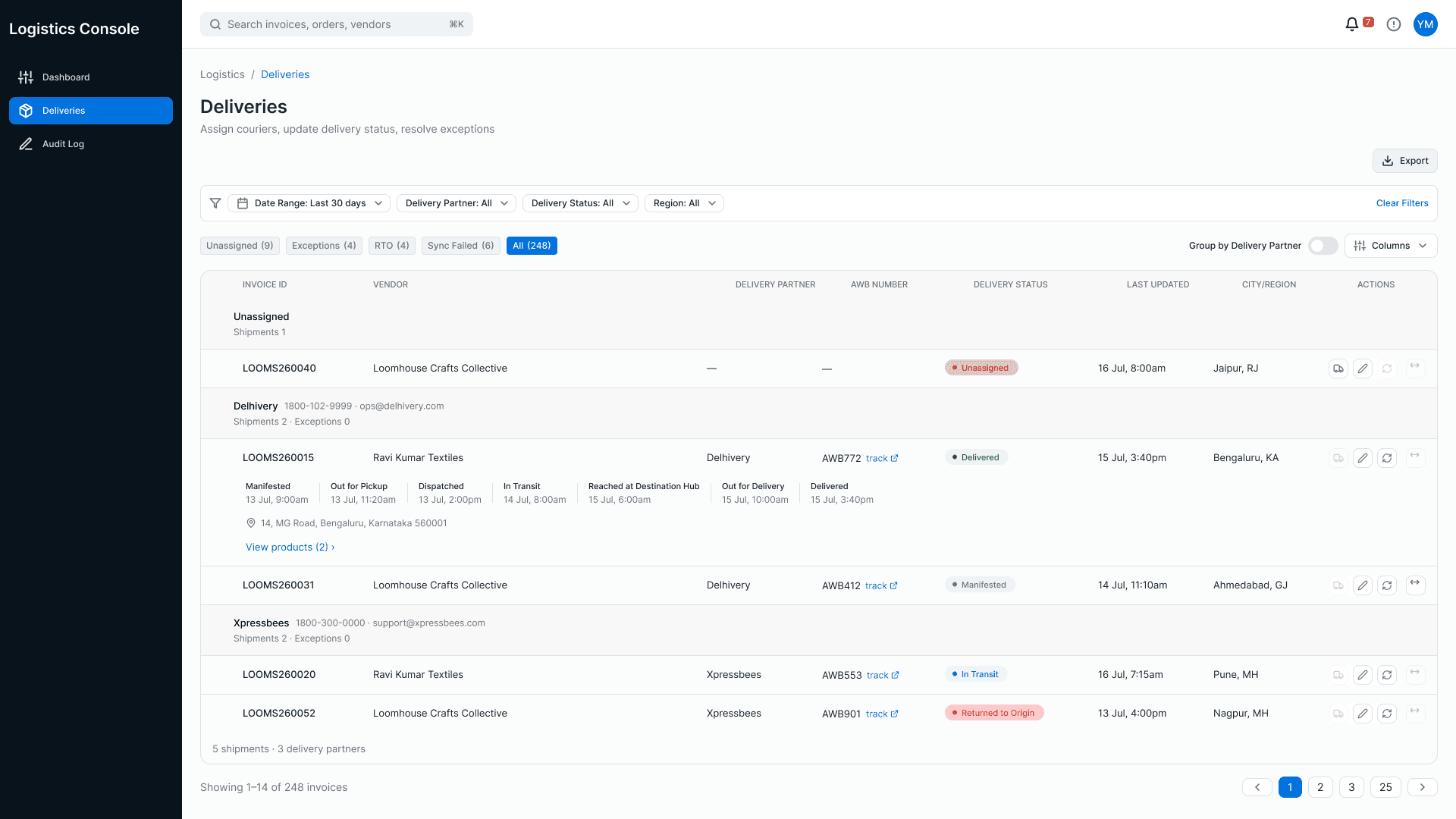
Unassigned shipments sit at the top. Each status change is a transition with a time, not a value that silently flips.
What the vendor sees
The vendor console answers three questions: what did I earn, what was taken out, and what is coming. The headline splits earnings into received, receivable and returns, and the next settlement shows its debit as a negative number instead of a smaller credit.
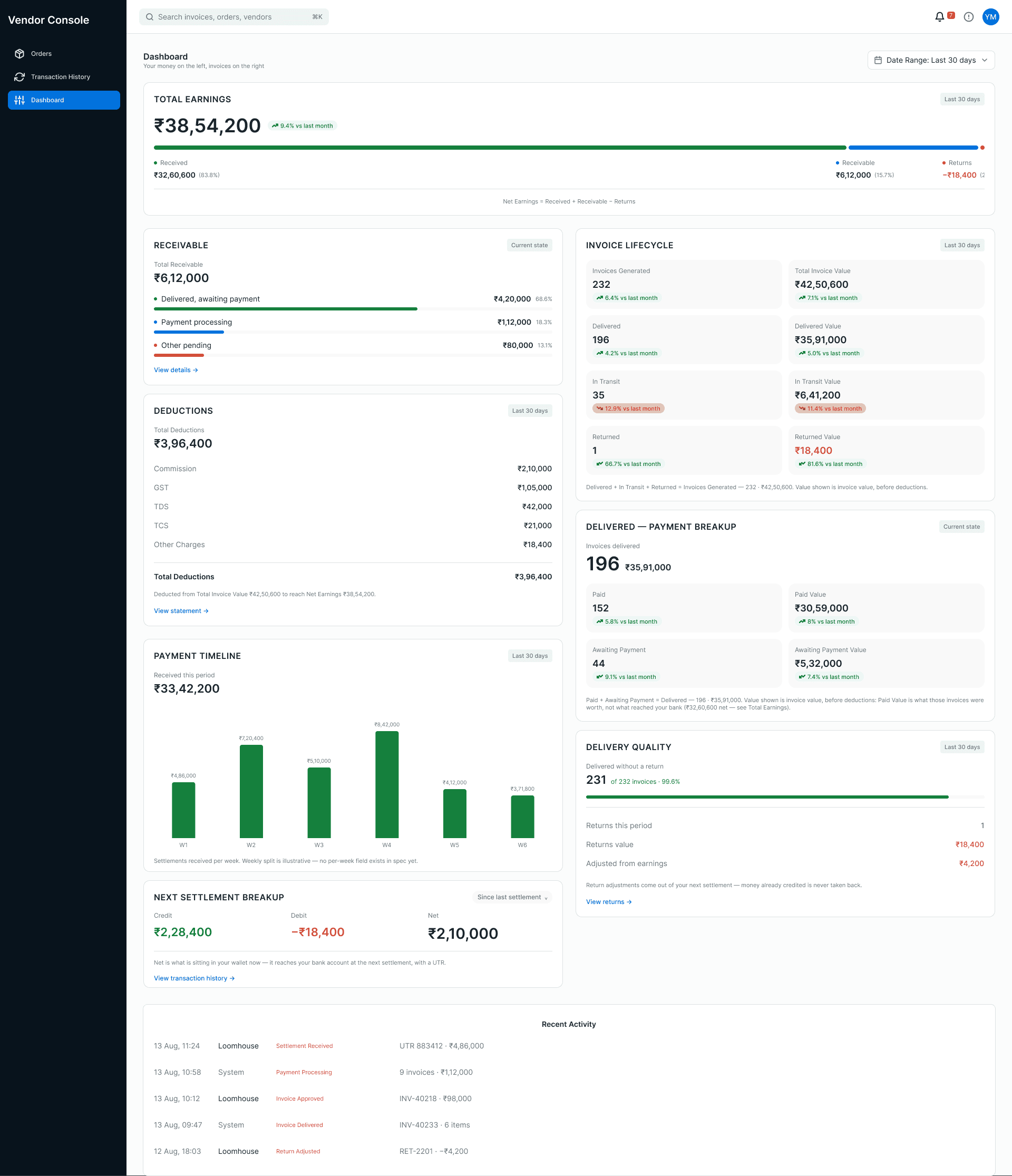
Receivable, not payable. Every deduction is listed by name, and return adjustments are stated as coming out of the next settlement.
Impact
The spreadsheets stopped. Not at once — people ran both for a while, checking the consoles against the files they trusted. Once the numbers agreed often enough, the files were abandoned.
One calculation, one record. The vendor and the marketplace read the same number. The hand reconciliation between two sets of figures no longer has two sets to reconcile.
No role can move money alone. Approve and transfer live in different consoles, and logistics cannot see payment at all.
Every exception has a place. Failures, reversals and returns are queues with a next action, not flags someone has to notice.
Nothing was instrumented, so this study claims no percentages.
What I would do differently
Showing a negative balance honestly is not the same as helping someone act on it. There is no warning before a return posts, and nothing tells the vendor when payments start again — though both are answerable from data the system already holds.
Two edges were also left undesigned: a pending approval has no owner if the approver leaves, and an approved order that is later returned still reads as approved for an amount that no longer exists. In a week I got the money right. What happens when a person steps out of the middle of it is the next thing I would build.